

As of 21 October 2026, 8:10 pm CEST. I update this page whenever something important changes. Anything I have not verified yet is marked “still open”.
What this page is, and what it is not: information from public, verified sources and my own experience, to the best of my knowledge on the day of publication. It is not advice for your individual case and does not replace any. Whatever you change on your website, server or devices, please decide together with the specialist who knows your setup (host, agency, administrator), based on the situation at that time. The situation changes by the hour; what is right tonight may be outdated tomorrow.
What has been added since the first version (update log, newest first)
- 8:05 pm: share image switched to the green solution picture, solution picture next to self-help; the red problem picture stays at the top.
- 8:00 pm: assistant prompt: asks for your details, evaluates, proposes options (only switch the PHP version, static copy, briefly offline). Two rules “backup first, guidance or own risk”. Note on the host's own backup.
- 7:45 pm: self-help as expandable sections: make static, backup, patch for own servers, benefits of a static site with this site's PageSpeed measurement. Three ways to put the copy live. Text width on phones fixed.
- 7:15 pm: self-help “make the website static” with prompt and Claude Code guide. Change passwords calmly.
- 6:55 pm: note “information, not advice”.
- 6:45 pm: web business card instead of going offline. Three frequent questions: offline? e-mails? maintenance mode?
- 6:40 pm: RUS-CERT and watchTowr confirm attack attempts. Traffic light per case, time window until Friday.
- 6:20 pm: first version: first 10 minutes, am I affected, step by step, interim measures, spotting a break-in, template for the host, sources.
✓ Do this today
- Check your PHP version and update it: safe versions are 8.5.12, 8.4.27, 8.3.36 or 8.2.35. With most hosts that is two clicks in the customer panel (guide below).
- Ask your host or agency whether the server is patched. There is a ready-made message below.
- Take a backup before you change anything: files and database. One click on “back up now” in the hosting panel is enough.
- After the update, click through: home page, contact form, shop checkout, login.
- Quick win if your host is not there yet: make the website static for a few days, with AI assistance within an hour. To the self-help guide ↓
- If you get stuck: your host or agency are the right people to ask today; this question is routine for them. My existing customers reach me as usual.
✗ Do not
- Wait “because the site is only small”. The attacks run automatically against everything on the internet. Size does not matter.
- Update only WordPress, plugins or the shop. The flaw is in PHP itself, underneath your website. An application update alone does not help.
- Switch back to an old PHP version because a plugin complains. Anything below 8.2 receives no official fix any more.
- Clean up or reinstall yourself if you suspect a break-in before the evidence is saved. What to do instead is below.
What happened, in plain words
Since this afternoon, hospitals, cities and authorities have been taking their websites offline: in the Stuttgart region eight of thirteen large hospitals were temporarily unreachable in the early evening, later still five, plus authorities in the Netherlands, Denmark and Finland, the city of Mainz, Wikipedia services. Not because they were hacked, but as a precaution. The reason lies in a component almost every website uses and hardly anyone knows: PHP.
What PHP is, in two sentences: a website is not simply a file sitting on the internet. When somebody opens your site, a program on the server assembles it at that very moment, from your texts, images, the contact form, the shop. For roughly seven out of ten websites that program is PHP. It is the engine behind the site: you never see it, but nothing runs without it. WordPress, TYPO3, Joomla, Shopware, Nextcloud, almost every agency-built site, the small club site from 2015, all PHP.
On 21 October 2026 two severe bugs in this engine became public. Together they are called “PHP2Shell” (identifiers CVE-2026-109618 and CVE-2026-109619) and are rated critical at 9.2 out of 10. The picture: somebody can reach through your website's letterbox and press the door opener from inside. No password, no user account, just your site's address. Once inside, they can do whatever your website is allowed to do, and on top read what is currently in memory, such as passwords.
What makes this one special: according to the researchers, every PHP version since PHP 5 is affected, so very old sites too. That is why it hits not only hospitals but equally the company site with five pages and the club site with the event calendar. Ready-made updates exist only for PHP 8.2 to 8.5; for 7.4, 8.0 and 8.1 the PHP team provides source-code fixes that hosts and Linux vendors still have to turn into packages (Ubuntu has already done so for 8.1). Germany's BSI rates the situation “very high”; authorities in the Netherlands, Denmark and Finland, Wikimedia and German cities have taken services offline as a precaution.
How easy is a break-in, and what can happen then?
I will put it the way I would on the phone with a customer:
- No credentials needed. The attacker only needs your website's address and sends crafted requests, for example through an upload form. Nothing has to be guessed.
- It does not work on the first try, but it works on the thousandth. The researchers describe that several thousand requests are needed. Tedious for a human, a matter of minutes for an automated program. Exactly such programs are now sweeping the whole internet.
- What becomes possible: the attacker can do whatever your website is allowed to do on the server: read and change files, plant a backdoor, inject malicious code into your pages, redirect visitors to scam sites, copy your database with customer data, send spam. One of the two flaws additionally leaks contents of the server's memory, according to the researchers at Wiz passwords, session tokens, API keys and certificates. Administrator rights on the whole server do not come automatically; that would take a second flaw.
- Apache with “mod_php” is hit hardest: there the attack strikes before your website even runs, so even an empty test page is exposed. With the more modern PHP-FPM mode a complete attack has not been demonstrated yet, but the PHP team rates it as possible. Only your host can tell you which mode they use.
- Are there attacks and ready-made attack tools already? Cloudflare has seen attack traffic against its customers since the night of 21 October; the US agency CISA, Germany's BSI and several security firms had no confirmed successful attack as of the afternoon. Since the leak, attack programs have been circulating online; the SANS Internet Storm Center called them “unreliable and incomplete” at noon, in the afternoon the RUS-CERT of the University of Stuttgart successfully reproduced one of them on a test system, and the security firm watchTowr sees attacks on its honeypots. As of 6:40 pm there is still no publicly confirmed real victim. The BSI expects mass attacks “within a few hours”.
Hence my advice: update today, not at the weekend. My estimate of the time window: today and tomorrow the risk for an individual site is still small, because attackers are still refining their tools. From the weekend on it rises sharply, and from the second week on I expect mass infections of unpatched sites. Whoever has patched by Friday, 23 October, is most likely through. Anyone with personal data on the web (practice, law firm, club, shop) should not wait that long.
Am I affected? Your case at a glance
Find what applies to you in the left column. The right column tells you what to do. The traffic light is my assessment of the urgency as of this evening.
| Left: your case | Right: your solution |
|---|---|
| Website builder at Jimdo, Wix, Squarespace, IONOS MyWebsite, Shopify or similar | Green The provider runs the technology and has to patch it. There is nothing for you to set. Check the provider's status page; if they stay silent until tomorrow, ask (template). |
| WordPress, TYPO3, Joomla, shop on a shared hosting plan (IONOS, Strato, All-Inkl, Hetzner, Mittwald, Hosteurope, netcup and others) | Amber (Red if your site still runs on PHP 8.1 or older, or the host does not reply by Friday.) The host provides the new PHP versions, you select them. In the customer panel under “PHP version” or “PHP settings”, switch to 8.3.36, 8.4.27 or 8.5.12. If the new number is not listed yet: ask the host and use the interim measures. |
| Your own server or VPS (Plesk, cPanel, Docker, self-managed) | Red until patched. You or your agency have to update yourselves: renew the distribution's PHP packages or the Docker image, restart PHP, verify the version. No admin at hand? The server's host usually has an emergency service for this, and Plesk and cPanel publish their own instructions. |
| NAS, firewall or router with a web interface: QNAP, Synology, pfSense, OPNsense, DrayTek, ZyXEL, Netgear, TP-Link and others | Red while the interface is on the internet; green once it is reachable only inside your network or via VPN. Many of these devices have PHP built in, and updating the server does not patch the embedded PHP. Check whether the admin interface is reachable from the internet and switch that off. Then watch for vendor updates. The Dutch agency NCSC-NL lists QNAP, Synology, OPNsense, Palo Alto and Citrix as “under investigation” (as of 6 pm); I have not yet read the vendors' own statements. |
| Pure HTML site without PHP, like this one | Green Not affected. Still check whether an old PHP installation is lying around on the same hosting plan, such as a forgotten WordPress in a subfolder. |
| Website managed by an agency, you don't know what runs behind it | Amber (Red if customer data lives on the site.) Send the template to the agency today and ask for a short reply by tomorrow. This question is routine for agencies; you are not stepping on anyone's toes. |
Step by step: switching the PHP version at your host
- Start a backup. Look for “Backup” in the customer panel and click “back up now”. With WordPress, also run a backup plugin if you have one.
- Find the PHP version. Depending on the host, the item is called “PHP version”, “PHP settings” or “webspace settings”. IONOS: Hosting → PHP version; Strato: Databases & webspace → PHP version; All-Inkl: KAS → Domain → PHP version. Plesk: Websites & Domains → PHP settings.
- Read the exact number. The third digit decides: 8.3.36 is safe, 8.3.35 is not. If the panel only shows “8.3”, WordPress reveals the full number under Tools → Site Health → Info → Server; for other systems ask the host.
- Switch and save. If your site still runs on 7.x or 8.0/8.1, now is the moment for 8.3. Most current WordPress and TYPO3 installations run on it without changes; old themes and plugins may break. That is what the backup from step 1 is for. Whether your host offers a patched build for the old branches shows in their version list; do not count on it.
- Click through. Home page, a subpage, submit the contact form, for shops put a test product in the cart. White page or error? Switch back to the previous version, restore the backup, call your agency or me.
If the update is not available yet: interim measures
The PHP developers list settings that make the attack considerably harder, but do not replace the fix. They apply only until the update.
- For hosting customers: you cannot set these yourself. The PHP project states explicitly that values in
.user.ini,.htaccessor in code (ini_set) do not take effect here; with Apache mod_php,php_valuelines in.htaccessare even part of the attack path. Only the host can set them server-side (php_admin_value). So ask whether they have disabled the “upload progress” feature (session.upload_progress) and which interim rules are running. Many large hosts use the Imunify360 rule set or their own filters for that. - For server operators: in
php.inior the FPM pool setsession.upload_progress.enabled = 0,post_max_size = 8M(32M if uploads are needed),max_input_nesting_level = 8,expose_php = 0, on PHP 8.5fatal_error_backtraces = 0, and with PHP-FPM a lowpm.max_requests. The also-mentioned settingmemory_limit = -1removes the memory cap and can bring the server down; only with monitoring and only briefly. No memory limits viaulimit(RLIMIT); those trigger exactly the bug. After every change and after the update, really restart all PHP processes: anapachectl gracefulkeeps the old mod_php loaded. Verify the running version afterwards through a page request (phpinfo), not on the command line. - A shield in front: if you use Cloudflare, even on the free plan, you get rules that block known attack patterns. That is a fence, not a foundation.
- Emergency brake: if none of this is possible and the site holds customer data, better go offline for a day than stay open all weekend. But properly: the “maintenance mode” of WordPress or Shopware does not help, PHP keeps processing every request. PHP itself has to be off and a static page served; at a host that usually means “disable PHP” or a ticket. Server operators can instead block file uploads (multipart) at the web server or allow read requests (GET/HEAD) only.
- The middle way instead of going offline, the “web business card”: serve your website as a pure HTML copy, i.e. home, services, opening hours, contact as fixed pages without PHP. Without PHP there is nothing to attack, you stay visible to customers and Google, only forms and logins are off meanwhile. Then patch, verify and switch back at leisure. Whoever maintains your site can pull such a copy in one or two hours; how to do it yourself with AI assistance is under self-help.
How do I know whether someone is already in?
The researchers list signals to watch until the update is in place. Most of them are only visible in the server logs; your host or agency can check.
- A sudden spike of “500” errors or memory-limit messages, especially after form uploads.
- Unusually large or malformed session cookies (
PHPSESSID). - PHP processes restarting constantly.
- Visible to you: new unknown files in the webspace, unknown admin users, a changed page title, redirects to foreign sites, Google warnings (“This site may be hacked”), complaints about spam from your address.
If you see one of these signs:
- Do not clean up, save first. A full backup of the current state, including logs, before anyone deletes anything. That is your evidence.
- Take the site offline (maintenance page) so visitors are not put at risk.
- Change passwords, from a different device: hosting access, FTP, database, admin logins; then renew all API keys and certificates, because the flaw can leak exactly those.
- Inform your host; they often know more and can preserve logs.
- Check your reporting duty: if customer data was reachable (shop, practice, law firm, club with member data), a report to the data protection authority within 72 hours may be required. Clarify that with your data protection officer or lawyer; I provide the technical facts.
- Only then reinstall, from a clean backup taken before the break-in, with fresh PHP.
How I handle such a case, copy first, then read the traces, then clean up, is described on the page After a scam call: secure first, then clean up. The same principle applies to a server.
Self-help: make your website static, back it up, patch it, with AI assistance
If your host is not ready yet, a static copy of your website is the best interim solution: plain HTML pages without PHP. Where no PHP runs, there is nothing for this flaw to attack; customers and Google keep seeing the site, only forms, login and shop are off meanwhile. The instructions are below, each one expandable: first making the site static, before that the backup, then the patch for your own server, and finally what a static site brings in the long run.

Before you start, two rules: first, backup first, always, of files and database. Second, have the person who built or maintains your site, or your administrator, accompany you. Without that guidance you act at your own risk; the AI helper is a tool, not a substitute for someone who knows your setup.
Make your website static, with an AI assistant: ask first, then evaluate, then act
This used to be an afternoon of manual work. With an AI tool working on your own computer it takes about an hour, even without technical skills. Then patch at leisure, check, switch back.
What does not work statically, and what instead: contact form → mail link and phone number. Login or members area → stays off, with a note. Shop and cart → “order by phone or e-mail”. Search, comments, appointment booking, newsletter sign-up → off, with a note. That is exactly what the prompt checks first, so you know beforehand what you give up.
What you need: a Claude account with a subscription (the AI helper is called Claude Code and runs on your Mac or Windows computer), the credentials for your hosting, one hour and the prompt below. I work with it daily myself; the prompt comes from my own work on exactly this topic. With a Pro subscription and the Claude desktop app, the assistant works directly on your files. Without Claude Code it also works in the normal chat by copy and paste, but only for questions, evaluation and the patch guidance; the static copy itself needs the tool on your computer.
Setting up Claude Code in three steps:
- Account: sign in at claude.ai and choose a subscription (Pro is enough).
- Program: either install the Claude desktop app and open its “Code” tab, or paste the command from the official page claude.com/claude-code into the terminal (Mac: Applications → Utilities → Terminal; Windows: PowerShell). The page explains both ways.
- Start: create an empty folder (say “website-copy”), open it in Claude Code, paste the prompt below, send. The helper guides you through everything else and asks before each step.
The assistant prompt: it first reads this page as its basis, then asks for your details (address, system, host, where the domain is managed, who built the site, what it must do, whether a backup exists), evaluates and proposes options: only switch the PHP version, static copy via one of the three ways, or briefly offline. Only after your decision does it continue step by step. Copy and paste, nothing to fill in:
You are my IT assistant; I am not a technician. Explain everything without jargon, ask me one thing at a time, and do nothing (delete, upload, switch) before I explicitly approve it.

Step 1, get the basis: first read my information page https://www.riedelit.de/en/php2shell-vulnerability-what-to-do/ completely, especially the sections “interim measures”, “self-help” and “how to put the copy live”. That is the current state you take as your basis.

Step 2, ask for my details, one question at a time:
- The address of my website.
- What it is built with (WordPress, TYPO3, Joomla, shop system, website builder, I don't know).
- Which host it is with and whether I have access to the hosting panel.
- Where the domain is managed (same host or elsewhere) and whether I can change DNS settings.
- Whether the webspace allows several folders and whether I can point the domain to another folder in the panel.
- Who built or maintains the site, and whether I can reach that person right now.
- What the site must be able to do: contact form, login, shop, appointment booking, search, newsletter, several languages.
- Whether there is a recent backup, and whether my host offers a backup in the panel.
- Which PHP version the panel shows and whether 8.5.12, 8.4.27, 8.3.36 or 8.2.35 can already be selected there.

Step 3, evaluate and propose options: summarise what you understood, then propose with reasons what fits my case:
A) Only switch the PHP version in the hosting panel if the host already offers the patched version. Then the static copy is not needed.
B) Static copy as an interim solution, with the suitable way to put it live: (a) copy into another folder on the same webspace and point the domain to it in the panel; (b) if that is not possible locally: copy to another web server or website builder and redirect the domain there via DNS; (c) swap in the same folder, setting the old installation aside.
C) Take the site offline briefly if neither A nor B is possible today and customer data lives on the site.
For each option name effort, side effects and the way back. Recommend one. Point out that I should coordinate this with the person who built or maintains my site, and that without that guidance everything happens at my own risk.

Step 4, execute only after my decision: first the backup (files and database, preferably via the host's backup feature, otherwise by download), then the chosen path step by step. For B: first check what does not work statically and suggest a replacement for each item (form → mail link and phone number, shop → note “order by phone or e-mail”); then create a complete static copy (all pages, images, stylesheets, fonts, relative links, e.g. with wget --mirror or httrack); check the copy locally in the browser and show me what is missing or broken; explain the upload, putting it live via the chosen way, switching PHP off and the way back.

Step 5, wrap-up: summarise on half a page what runs now, what is missing, what I should write to my host or agency, and when I can switch back.
How to put the copy live, three ways, each with a way back:
- Fastest way, new folder: most web space allows several folders. Upload the copy to a new folder (say “static”) and, in the hosting panel, point the domain to that folder; at IONOS, Strato and All-Inkl the setting is called “target directory” or “domain target”. The old installation stays untouched. If the panel offers it, also switch PHP off for the web space. Way back: point the domain to the old folder again, one minute.
- Web business card elsewhere: upload a lean page with home, services, opening hours and contact at another provider or site builder and redirect the domain there via DNS. Takes minutes to hours because of DNS. Makes sense if your own host offers nothing at all. Way back: reset the DNS, takes just as long.
- Swap in the same folder: move the old installation into a subfolder “old-2026-10” (do not delete it), put the copy into the main folder. Only with a prior backup. Way back: move it back.
Before that: a backup with AI assistance
Before you change anything, make a backup on your own computer: the website files and the database. With most hosts, “back up now” in the customer area is enough. If you also want the backup locally or prefer to be guided, give Claude Code the prompt below. One rule first: credentials do not belong in the chat. Enter passwords only where the program on your computer asks for them, say in the login window of the FTP program or the hosting panel.
Check your host first: many providers offer their own backup in the customer panel (“Backup”, “Restore”), often daily and automatic. A click on “back up now” there is the simplest way; the assistant below is for everyone who does not have that or wants an additional copy on their own computer.
You are my IT helper; I am not a technician. Explain everything without jargon and ask me before each step. Do not delete or change anything on the server.

My website: [address, e.g. https://www.my-company.com]
System: [WordPress / TYPO3 / Joomla / I don't know]
Host: [e.g. IONOS, Strato, All-Inkl / own server]
Goal: a complete backup of my website on my own computer before I change anything because of the PHP security flaw “PHP2Shell” (21 Oct 2026).

Please proceed like this:
1. Create a folder “backup-[today's date]” on my computer and explain briefly what has to be backed up: the website files (texts, images, themes, plugins, configuration file) and the database.
2. Files: show me how to download them, either via my host's SFTP or FTP access or as a download in the hosting panel. If credentials are needed, tell me where to enter them on my computer. I will not write them into the chat.
3. Database: show me how to export it, usually via the hosting panel or phpMyAdmin; on my own server with mysqldump. The export file goes into the same folder.
4. Check the backup for completeness: number and total size of the files, whether the database file is not empty, whether the configuration file is included (wp-config.php for WordPress).
5. Finish with a summary: what is backed up, where it is, what is still missing. Everything on the server stays as it was.
For your own server: closing the flaw with AI assistance
This part applies only if you run your own server or VPS (Plesk, cPanel, Docker, Ubuntu or Debian). Customers of a hosting package cannot patch themselves; they only select the PHP version, as described above. If you have an administrator, let them do it. If you do not, Claude Code can guide you; the prompt demands a question before each step and nothing without a backup.
You are my IT helper for my own server; I am not an administrator. Explain every command before you run it and ask me before each step. Nothing without a backup.

My server: [Ubuntu / Debian / Plesk / cPanel / Docker / I don't know]
Web server: [Apache / nginx / I don't know]
Website on it: [address, system, e.g. WordPress]
Goal: close the PHP security flaw “PHP2Shell” (CVE-2026-109618 and CVE-2026-109619, 21 Oct 2026) on this server.

Please proceed like this:
1. Find out which PHP version is running and in which mode (mod_php or PHP-FPM). Explain to me what that means for me.
2. Check whether a current backup exists (files, database, configuration). If not: back up first, then continue.
3. Update PHP via my distribution's packages. The target is 8.5.12, 8.4.27, 8.3.36 or 8.2.35, or the fixed build (backport) my distribution offers for its PHP version. With Docker: renew the image.
4. If the package is not available yet: set the interim values from the official PHP security announcement, at least session.upload_progress.enabled = 0 and a small post_max_size, and explain to me that this only applies until the update.
5. Afterwards really restart ALL PHP processes, i.e. web server and PHP-FPM. A “graceful” restart is not enough.
6. Check the running version via a page request (e.g. a phpinfo page that you delete again afterwards), not only on the command line.
7. Go through the web server and PHP logs for traces: clusters of 500 errors, memory limit messages, unusually large session cookies, PHP processes restarting constantly. Show me what you find and assess it soberly.
8. Then remind me to change the passwords and keys the server knows (database, mail, API keys, certificates) and suggest an order.
9. Finish with a summary: version before and after, which values are set, what the logs showed, what is still open.
A static site is still the safer way as long as the situation lasts.
What else a static site brings
A static site is not a stopgap but a principle of its own. This site runs that way. What it brings, soberly listed:
- Faster: the server does not have to assemble anything, it delivers finished pages.
- Less attack surface, permanently: without PHP, plugins and database, most of what otherwise needs patching is gone.
- Hardly any maintenance: no updates of system, theme and plugins getting in each other's way.
- Cheaper to run: a small hosting package is usually enough.
How this shows in numbers: this very website has been static since its rebuild. This is what Google's PageSpeed test for the home page looked like on 21 October 2026 at 7:37 pm (mobile measurement):
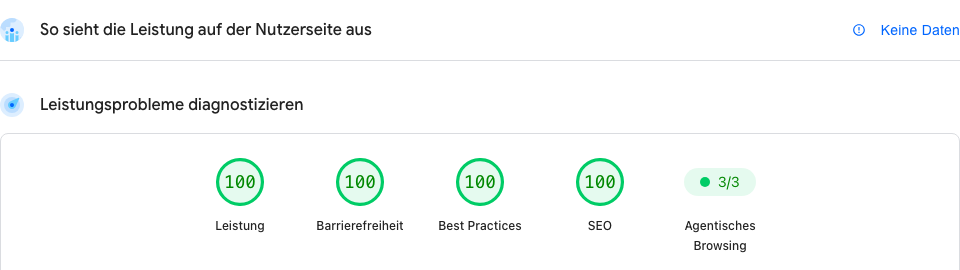
After the situation is over, the static principle can be adopted permanently: what is the interim solution today then becomes the actual website. If you would like that for your site, you may write to me, riedel@riedelit.de, subject “Make website static”.
I answer in order of arrival and tell you honestly whether and when I can take it on.
Three questions I was asked most often today
Do I really have to take my site offline?
No, not as the first step. The order is: backup, switch the PHP version, click through. Going offline is only the emergency brake if the update is not possible and the site holds customer data, logins or a shop. Even then the web business card is usually better than an empty page. The UK's NCSC says the same: offline only as a last resort.
If someone is on the web server, can they read my e-mails too?
Not automatically, but often by detours. The attacker gets your website's rights, not your mailbox's. On a hosting plan, website and mailboxes usually live on separate systems; then they cannot reach the mails directly. Three detours are real, though: first, if your website sends mail itself (contact form, shop, WordPress with an SMTP plugin), that mailbox's password sits in the configuration or in memory, and that is exactly what the flaw can leak. Second, if you run webmail (such as Roundcube) on the same server, it runs on PHP and is affected itself. Third, if you use the same password for website and mailbox. So after a break-in: change the password of every mailbox the website knows, check forwarding rules and the “Sent” folder for anything foreign, enable two-factor authentication for the mailbox. And without a break-in? Calm is strength: first the update, then over the next days change the passwords the website knows, one after the other, with a note of everywhere they are stored. Frantically changing everything tonight causes more lock-outs than security. Your mail delivery (DNS, MX) is unaffected as long as the hosting account itself was not captured.
Is it enough to put WordPress or the shop into maintenance mode?
No. Maintenance mode is a page that PHP displays; PHP keeps processing every request, including the attacker's. Protection only comes without PHP (static copy), with uploads blocked at the web server, or fully offline.
Template: how to ask your host or agency
Copy, fill in the names, send. That is all it takes.
Subject: PHP2Shell (CVE-2026-109618/109619): status of our website
Hello,
on 21 October 2026 two critical PHP vulnerabilities became public (“PHP2Shell”, CVE-2026-109618 and CVE-2026-109619). Please let me know briefly:
1. Which PHP version currently runs for [domain]?
2. Is the patched version (8.5.12 / 8.4.27 / 8.3.36 / 8.2.35) already deployed, or when will it be?
3. Which interim measures have you enabled (e.g. session.upload_progress disabled, WAF rules)?
4. Do the logs show any attack attempts against our site?
I would appreciate a reply by tomorrow. Thank you.
[Name, company, phone]
Where I follow the situation
These sources document the course of events continuously and soberly; I read all of them on 21 October. If you read only one: the first.
- PHP project: official security announcement, the source for version numbers, affected setups and all interim settings.
- SANS Internet Storm Center, the early-warning centre has raised its alert level to yellow and updates the entry continuously.
- NCSC-NL: software inventory “php2shell”, the Dutch agency maintains, as with Log4Shell, a list of which products (Plesk, QNAP, Synology, Shopware …) are affected.
- Sansec: PHP2Shell, timeline, mitigations and detection signals from the e-commerce security firm that was among the first to report.
- Cloudflare blog, the only source with a view of real attack traffic, plus the protection rules.
- Wiz Research, co-discoverers, technical analysis and detection signals.
- CISA alert and the UK NCSC alert, government guidance in English.
- BSI press release (German), the German federal office rates the criticality “very high”.
- heise online (English), analysis with quotes from the PHP team.
Still open (as of 6:20 pm): I have not yet found status notices from the large German hosts (IONOS, Strato, All-Inkl, Hetzner, netcup, Mittwald, Hosteurope); Plesk and cPanel packages were announced in the afternoon but not yet shipped. I will add them.
A frank word: who can help you today
My existing customers will hear from me in these days, or reach me as usual. I cannot take on new jobs related to this flaw at the moment; I am a one-person business, and the capacity belongs to the customers I already look after. The one exception: making a website static, you may write to me about that. This page is therefore my help for everyone else: share it, print it, send the template to your host. The right contacts today are: your host (support ticket, status page), your agency or the provider who built the site, and in case of a break-in involving personal data also your data protection officer.