
✓ What you should do
- Switch the PC off immediately or disconnect it from the network – active malware keeps causing more damage every minute
- From a second device: check your bank account for unfamiliar debits
- Change your passwords step by step – only from the clean second device; remember the ones saved in your browser (Firefox, for example)
- Call me, you reach me directly: +49 711 3588558
✗ Never do this
- Never trust a “support hotline” number that appears on your screen, and never call it – that is exactly how the scammers operate
- With ransomware, don't pay hastily – data can often be restored another way
- Don't keep working while the system is still infected
- With business data, no do-it-yourself attempts – a half-cleaned system remains a risk
Your PC safe again

Benjamin Riedel
You call, I answer.
Is your PC or notebook infected with a trojan or a computer virus? Is your data encrypted? Unusual pop-ups, a suddenly slow system, locked files or a ransom demand? Now fast but considered action is what counts.
Encryption trojans (ransomware)
Malware such as TeslaCrypt or Locky belongs to what is known as ransomware: it encrypts your documents, photos and databases and demands a ransom. TeslaCrypt usually reaches the system through an email attachment and gradually encrypts every file it can reach – including files on network drives. Locky spreads through fake emails containing manipulated Word files. Important: at the first suspicion, switch the system off immediately so the encryption cannot continue.
How I proceed
- Analysis of the infection – which malware, and which systems are affected?
- Data backup before any work is done on the system
- Cleanup of the system, or a clean reinstallation
- Restoration of your data from backups or via data recovery
- Hardening, so that it doesn't happen again
I am happy to come to you on site in the greater Stuttgart area for virus removal, decryption and trojan removal – or you bring the affected system to me. I, Benjamin Riedel, take care of your case personally.
Example: the “federal police trojan”
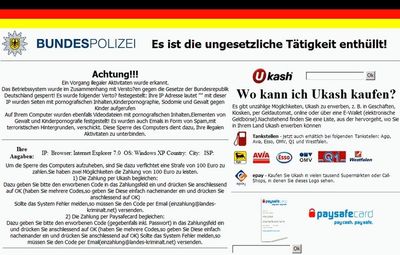
A classic: the screen is locked, supposedly by the German “federal police”, and a fine is demanded. There is no authority behind it, only extortion software – and it can be removed reliably, without paying anything.
Causes & prevention
The most common ways in – and how you close them:
Typical causes
- Missing security updates for the operating system and for programs
- Attachments and links in phishing emails
- Browsing insecure sites, infected downloads
How you prevent it
- Install updates regularly
- Use a reputable antivirus solution and a firewall
- Make regular backups on separate media
Remove trojans yourself – or have it done?
Simple adware can often be removed by yourself with an up-to-date virus scanner. With ransomware, rootkits or whenever business data is affected, I advise against it: the effort is high and the risk of losing data – or of keeping a system that is still not clean – is too great. When in doubt, just call briefly; I will assess the situation honestly.
Learning from real attacks
Well-known organizations are targeted regularly too – and almost every time the way in was avoidable:
- WannaCry (2017): the ransomware paralyzed systems worldwide – in Germany it hit the departure boards of Deutsche Bahn, among others. → Install security updates promptly; the patch that would have protected them had been available for a long time.
- Düsseldorf University Hospital (2020): an encryption attack paralyzed the hospital and the emergency department had to turn patients away. → Close known vulnerabilities in remote access immediately.
- Colonial Pipeline, USA (2021): the largest fuel pipeline in the USA stood still and panic buying followed. → A single old access password without two-factor protection was enough for the attackers.
- Continental (2022): the ransomware group LockBit stole around 40 terabytes of data. → Attackers are often inside the network unnoticed for weeks – monitoring and network segmentation are decisive.
- Südwestfalen municipal IT (2023): an attack on a single IT service provider paralyzed more than 70 towns and municipalities at once. → Secure your service providers and supply chains, keep backups separate and test them regularly.
Current ransomware groups such as LockBit or BlackCat (ALPHV) combine exactly these routes: phishing, data theft and encryption. The best protection remains up-to-date systems, trained staff, tested backups and cleanly secured IT – and that is precisely where I support you, including with the IT Health Cockpit.
Frequently asked questions about trojan & virus removal
My data is encrypted – should I pay the ransom?
Please don't do it hastily. Paying is no guarantee and it finances the perpetrators. Data can often be restored from backups or through specialized methods. Call me before you pay – I will check the options with you.
Will all my data be gone after the cleanup?
Not necessarily. Before every cleanup I back up your data. Depending on the infection, it is then restored from the backup or through data recovery.
Do you come to my company as well?
Yes, in the greater Stuttgart area I come on site for virus and trojan removal. Alternatively you bring the affected device to my specialist workshop.
How do I protect myself in the future?
Current updates, a good antivirus solution, tested backups on separate media and caution with email attachments. For companies I set up a well-considered security and backup concept on request.
Where my customers come from
From Stuttgart and all of its districts as well as the surrounding towns in the greater Stuttgart area – from Esslingen via Ludwigsburg and Waiblingen to Böblingen and Sindelfingen.