

As of Monday, 16 November 2026
In short
As of Monday, 16 November 2026
- Your computer asks for a key: Do not reset or reinstall anything; look for the key first (technical term: BitLocker recovery). How to find it ↓
- Your email was stuck: Microsoft 365 was disrupted worldwide from the evening of 12 November to the evening of 13 November 2026, for some customers until the morning of 14 November. According to Microsoft, it was not an attack. What happened ↓
- Two separate events: The Microsoft 365 outage of November 2026 and the PHP security flaw of 21 October 2026 are two separate events with separate causes; no connection has been shown (the flaw's technical name: PHP2Shell). To the PHP flaw ↓
- The key question: If exactly one part fails, can you still get to your key? If you have settled that beforehand, you stay calm when an outage pushes you to act fast. The answer usually lies in the middle, between “everything with one provider” and “everything with me”. Which stage are you at? ↓
Where would you like to go?
- Your computer is asking for a long key? Do not reset anything yet. → What you can do
- Your email was stuck? The fault was at Microsoft, not on your side. → What happened
- You want to be prepared? → Which stage are you at?
- You run a website and need help with the PHP flaw from October? → Straight to the guide (technical term: PHP2Shell)
On the morning of Friday, 13 November 2026, my phone rings. A man, audibly shaken: he restarted his computer, and his wife restarted hers. Now neither shows the desktop anymore, only a blue screen asking for a long numeric key. He does not have it at hand. His plan: set everything up from scratch so that it works again.
My advice was the opposite. This screen is a protective feature of Windows. It appears when something at start-up feels different from usual, for example after an update. What caused it for this caller, I do not know. Only one thing is certain: whoever reinstalls now deletes what they want to save. Microsoft itself writes that resetting without the key removes all your files.
Behind this call lies a question anyone can ask. I call it the key question: If exactly one part fails, can I still get to my key?
First, put your feet up
So: put the computer aside. Make a cup of tea, put your feet up, let the sun shine on your face for ten minutes. And tell your body what is true right now: nothing is on fire. The key screen itself deletes nothing. In my specialist workshop I see that the danger usually comes only with the hasty rescue attempt, because reinstalling or resetting deletes the data for good.
Doing nothing at first does not mean never doing anything. It means: understand first, then act.
First aid in three sentences
Do not reset, do not reinstall. Photograph the screen with the key ID and look for the key from another device. Cannot find it anywhere? Call me before you delete anything: +49 711 3588558. In detail ↓
What happened in the Microsoft 365 outage of November 2026?
On Thursday, 12 November 2026, shortly after 5 pm German time (CET), Microsoft 365 went down worldwide, above all email (technical terms: Exchange Online, Microsoft Teams). According to Microsoft, it was not an attack. By the evening of 13 November the disruption was fixed, for the last customers the following morning. I use Microsoft 365 myself and was just as affected as my customers. Missing an email from those days? Advice in the questions ↓
For myself, I call those days a digital pandemic, with a question mark, because nobody gets sick. But it hit many people at once, and one thing really is passed on, from person to person: unease. Fortunately, so is a level head.
My perspective · From here on I tell how I experienced these days and what I take from them.
Why does an outage push you to act fast?
That same morning I was standing in front of a locked door myself. I wanted to change a setting with the provider where my domains are registered. But the confirmation code comes by email, and my email was stuck in the Microsoft outage. Each safeguard on its own is sensible. Together, they left the key inside the very house that had just been locked. My first thought: force another way in, somewhere. I let it be and waited.
When the door to your own account jams, no code arrives, and the key lying inside stays inside. In front of a door like that you want to do something, anything, and you quickly get caught in the gears: reinstall, reset, switch off the protection, believe the first “helper” who promises rescue. Each of these moves costs something: the data, the protection or your safety from fraudsters. Whether the outage played a part for the caller, I do not know; the pressure was the same.
What does the silence hint at?
Microsoft kept reporting what was down; only the most important question went unanswered for a whole day: Why? That one missing word is what I mean by silence, and the mind rushes into a gap like that just as hastily as the hand rushes to the “Reset” button. On the evening of 13 November a first answer came, and it was surprisingly ordinary: a problem with an earlier expansion of Microsoft's own network capacity.
Chernobyl under a bell jar of silence
An email outage is not a reactor disaster, and Microsoft did not keep silent; it was searching. What occupies me about Chernobyl is a single question: What happens to people when the explanation does not come?
In the night of 26 April 1986, a reactor explodes at Chernobyl. Afterwards, silence covers the disaster like a bell jar. The world finds out because on the morning of 28 April the radiation monitors at a power plant in Sweden go off. When Sweden asks, the Soviet government at first denies it. That evening, almost three days after the explosion, Soviet television carries a 20-second report. The May Day parades go ahead. In East Germany (the GDR), also informed late, people went without fresh milk and lettuce on their own initiative. Where nobody explains, everyone explains things to themselves.
Chernobyl teaches two things, because both were missing back then: that those responsible say openly what they know and what they do not, and that those waiting keep the question open instead of filling the gap with the worst. The first is owed by those who carry responsibility. The second is something anyone can practice, even at the kitchen table in front of a blue screen.
The ship is listing
Imagine a ship that starts to list. You can cling to the railing and hope everything stays as it was. You can run to the other side with the crowd because everyone is running; that is the rush in front of the locked door. Or you can walk calmly to the spot that is still level and see from there what needs to be done. That spot is what I call keeping a level head. And then comes the question I asked myself during those days: Where do I stand?
What does digital sovereignty mean for a small business?
For a small business, digital sovereignty means keeping your options open: having a second way for email, sign-in and data when one provider fails. An outage hits so many at once because so many build on the same few providers.

Both ends are fragile: on the left, everything stops when one provider stops; on the right, everything depends on me alone. The level spot on the ship lies in the green middle, and it makes me think of a body: each organ works on its own, all are connected, none holds everything. In IT that means several services, ideally from the region, that talk to each other, the way any mailbox can reach any other (technical term: federated IT).
Which stage are you at today? That is the key question, applied to your own office. Often the move from stage 1 to stage 2 alone makes a big difference: a second way to sign in and the key on paper. You do not keep the spare key in the same house; you leave it with a neighbor.
I myself was closer to stage 1 that Friday than I would have liked. I am taking the step to stage 2 now.
And while the email was stuck, my phone kept ringing. The man from Friday did not reach me by email; he simply called. That is a second way too, and the oldest one.
What can I do now, calmly?
Back on deck.
My computer is asking for a long key: what now?
- Photograph the screen, above all the key ID.
- Look for the key from another device: usually in your own Microsoft account at account.microsoft.com/devices/recoverykey, otherwise on a printout or USB stick from back then. For devices from an employer or school, the IT department usually has it.
- Sign-in code not arriving? Then it is better to wait than to reinstall. The key is not going anywhere.
- Computer still running: look up the key today, print it out and keep it away from the computer.
Sign-in codes: a second way
For your most important accounts, check whether the confirmation code only comes by email. If the provider offers a second way, such as an app, a text message or printed backup codes, set it up now, while everything is working (technical term: second factor).
Test the lifeboat
A backup that has never been restored is a lifeboat that has never been lowered into the water. Over the next few days, restore a single file from your backup. Then you know the boat floats.
What is not necessary
- Reinstalling or resetting while the key has not been found. That costs you the data.
- Switching off the protection, such as the encryption or the sign-in code, so that things go faster next time. Then it is missing when you need it.
- Trusting unknown “helpers”. Anyone who calls or writes because of an outage and wants access to your computer or account is no helper. Do not click, and do not hand anything over.
Has the calm advice proven itself before?
Yes, three weeks earlier, with a completely different event: the PHP flaw of 21 October. On this page I advised backing up first, then updating calmly, and taking the admin interfaces of firewalls and NAS devices off the internet. Break-ins happened mainly where such admin interfaces were openly reachable on the internet; an attack on normally configured websites had not been documented by the cut-off date. What I write above about speaking openly applies to me too: until 26 October this page said “Confirmed victims: 0”. From that day on it was out of date, and I corrected it too late. The whole story in the appendix ↓
The key question for the days ahead
An outage takes away your way in, not your data; what usually costs the data is the haste. So take ten minutes for the key question, ideally now, while everything is working: If exactly one part fails, can I still get to my key?
Is your computer stuck at the key screen right now? Do not reset anything, and call me. Whether the man from Friday found his key, I do not know; I will tell you what I told him: do not delete anything for now. Then I will go through with you where the key might still be. The first assessment by phone is free, and you do not have to decide anything right away. You are welcome to call in English.
Is the hard drive clicking, or is it no longer recognized? Then it is a case for my specialist workshop for data recovery.
You call, I answer.
Do you look after others yourself, or are you helping to build the middle, as an IT support provider, law firm, medical practice or with a data center in the region? Feel free to pass on the first aid. And if you are looking in the same direction as I am: let's talk. Nobody builds the middle alone.
And until then: make some tea, put your feet up. The door stays shut for a while, but it does not disappear.
Appendix for website owners · From here on it is about the PHP flaw of October, an event three weeks before the Microsoft outage. If you run no website, no shop and no NAS, you are done above. The frequently asked questions about the key screen are at the very bottom.
The PHP flaw of October: what came of it?
The Microsoft 365 outage of November 2026 and the PHP security flaw of 21 October 2026 are two separate events with separate causes; no connection has been shown (the flaw's technical name: PHP2Shell, identifiers CVE-2026-109618 and CVE-2026-109619).
On 21 October 2026 many websites went offline, and on this page I advised: back up first, then update calmly, do not switch the website off, but take the admin interfaces of firewalls and NAS devices off the internet. By 16 November, the cut-off date of this page, it had become clear that both were needed. Since 26 October the US cyber agency CISA has listed the flaw as actually exploited. Break-ins happened mainly where the admin interface of a firewall was reachable from the internet: Palo Alto Networks confirmed such attacks at the end of October, and Check Point describes two waves against a few dozen of its devices without the update, in a few cases with deleted data. For WordPress sites, the security firm Wordfence knew of no takeover on 28 October. Nobody gives a total number of victims.
Here, too, rushing was tempting: switching off entire websites, rebuilding in a hurry. For websites at a host that were updated calmly, no break-in through this flaw had been documented by the cut-off date. But level-headed does not mean careless. If you have not updated yet, catch up; if you run a firewall or a NAS with a web interface, take the admin interface off the internet and install the vendor's update. How to do that is in the reference section directly below.
To the complete help for website owners ↓
Reference: help with the PHP flaw for website owners
Help with the PHP flaw of 21 October 2026 (technical term: PHP2Shell), told up to the cut-off date of 16 November 2026. The host table shows the status of 26 October.
⚠️ You run a website, a shop or a NAS? The first 10 minutes
Why now? Since 21 October the flaw and its fix have been public, and since 26 October it has been demonstrably exploited. If you have not installed the update yet, catch up: calmly, but soon. More on this ↓
By when? Hosting customers: right away, if not done yet. Own servers, firewalls and NAS devices: immediately. Break-ins happened mainly where the admin interface of a device was reachable from the internet (more on this).
✓ Do this today
- Take a backup before you change anything: files and database. One click on “back up now” in the hosting panel is enough; that is your way back if the update breaks something.
- Check your PHP version and update it: safe versions are 8.5.12, 8.4.27, 8.3.36 or 8.2.35. With most hosts that is two clicks in the customer panel (guide below). You choose the version yourself; the protective settings on the server can only be set by the host.
- Firewall, NAS or router with a web interface: take the admin interface off the internet and install the vendor's update. That is exactly where break-ins have happened since late October. (Your device in the overview)
- Ask your host or agency whether the server is patched, i.e. has the security update installed. There is a ready-made message below.
- After the update click through: home page, contact form, shop checkout, login.
- My recommendation: make the website update-free. It then consists of finished pages that are not rebuilt on every visit, and it no longer needs security updates. That way this vulnerability misses, and so does the next PHP one. It is urgent if your host has no fix for your version or you run your own server; it makes sense for almost every business-card site. What that means and how ↓
- If you get stuck: your host or agency are the right people to ask; this question is routine for them. My existing customers reach me by phone and email.
✗ Do not
- Wait “because the site is only small”. The attacks run automatically against everything on the internet.
- Update only WordPress, plugins or the shop. The flaw is in PHP itself, underneath your website. An application update alone does not help.
- Switch back to an old PHP version because a plugin complains. For anything below 8.2 there is no ready-made update from the PHP project, only fixes by individual hosts; whoever gets none has to move up to 8.2 or newer.
- Clean up or reinstall yourself if you suspect a break-in before the evidence is saved. What to do instead is below.
Is my website affected? Your case at a glance
Find what applies to you; next to it is what to do. The traffic light is my assessment, as of the date above.
| Your case | Your solution |
|---|---|
| NAS, firewall or router with a web interface: QNAP, Synology, pfSense, OPNsense, Palo Alto, Check Point and other devices with built-in PHP | Red while the interface is on the internet; green once it is reachable only inside your own network or via VPN and the vendor's update is installed. This is exactly where break-ins happened. Updating the server does not patch the PHP built into these devices. Check whether the admin interface is reachable from the internet and switch that off. You will find the update for your device on the vendor's website. |
| Website builder at Jimdo, Wix, Squarespace, IONOS MyWebsite, Shopify or similar | Green The provider runs the technology and has to patch it. There is nothing for you to set. Check the provider's status page; if they stay silent, ask (template). |
| WordPress, TYPO3, Joomla, shop on a shared hosting plan (IONOS, Strato, All-Inkl, Hetzner, Mittwald, Hosteurope, netcup and others) | Amber Green as soon as the version shown in the customer panel is right; red only if it still shows 8.1 or older and the host reports no fix for it. The host provides the new versions, you select them: in the customer panel under “PHP version”, switch to 8.5.12, 8.4.27, 8.3.36 or 8.2.35. If the number is not listed yet: ask the host and use the interim measures. Who has patched is in the host table. |
| Your own server or VPS, i.e. a rented server that you or your agency manage yourselves (with Plesk, cPanel, Docker or set up by hand) | Red until patched. You or your agency have to update yourselves: renew the PHP packages, restart PHP, verify the version. The packages are there: Plesk ships 8.2 to 8.5, cPanel via CloudLinux every version from 5.2 to 8.5. No admin at hand? The server's host usually has an emergency service; Plesk and cPanel publish instructions. Details below under For agencies and administrators. Since late October, attackers have been chaining the flaw with a flaw in the Linux kernel; so install the operating system updates as well, not just PHP. |
| Pure HTML site without PHP, like this one | Green Not affected. Still check whether an old PHP is lying around on the same hosting plan, such as a forgotten WordPress. |
| Website managed by an agency, you don't know what runs behind it | Amber (Red if customer data lives on the site.) Send the template to the agency today and ask for a reply within a day; the question is routine for them. |
Step by step: switching the PHP version at your host
- Start a backup. Look for “Backup” in the customer panel and click “back up now”; with WordPress also the backup plugin, if you have one.
- Find the PHP version. Depending on the host, the item is called “PHP version”, “PHP settings” or “webspace settings”. IONOS: Hosting → PHP version; Strato: Databases & webspace → PHP version; All-Inkl: KAS → Domain → PHP version. Plesk: Websites & Domains → PHP settings.
- Read the exact number. The third digit decides: 8.3.36 is the official update, 8.3.35 is not. If the panel only shows “8.3”, WordPress reveals the full number under Tools → Site Health → Info → Server; otherwise ask the host. Pitfall: hosts often deliver their fix under the old number (cPanel PHP 8.4 shows “8.4.26” and is patched); then the host's notice counts, ask first, then raise the alarm.
- Switch and save. If your site still runs on 7.x or 8.0/8.1 and the host reports no fix for it, now is the moment for 8.2 or newer. Current WordPress and TYPO3 installations mostly run on it without changes; if old themes or plugins break, the backup from step 1 helps.
- Click through. Home page, a subpage, submit the contact form, for shops put a test product in the cart. White page or error? Switch back to the previous version, restore the backup, ask your agency or host.
If the update is not available yet: interim measures
The PHP developers list settings that make the attack harder, but do not replace the update.
- As a hosting customer you cannot set these protective settings yourself. They only work if the host applies them on the server; ask your host with the template. A web firewall, i.e. a filter in front of the website, stops only one of the two attack paths; the update remains mandatory.
- For your own server the interim values and the restart rule are below under For agencies and administrators.
- A shield in front: if you use Cloudflare, even for free, you get rules against known attack patterns. A fence, not a foundation.
- Emergency brake: if none of this is possible and the site holds customer data, better offline for a day than open all weekend. But properly: the “maintenance mode” of WordPress or Shopware does not help, PHP keeps processing every request. PHP itself has to be off; at a host that usually means “disable PHP” or a ticket.
- The middle way, the “web business card”: serve your website as a pure HTML copy, i.e. home, services, contact as fixed pages without PHP. Then there is nothing for this flaw to attack, you stay visible, only forms and logins are off meanwhile. How to do it: self-help.
How do I know whether someone is already in?
The researchers list signals that you or your host should watch until the update is in place; most of them are only in the server logs.
- A sudden spike of “500” errors or memory-limit messages, especially after form uploads.
- Unusually large or malformed session cookies (
PHPSESSID), PHP processes restarting constantly. - Visible to you: new unknown files in the webspace, unknown admin users, a changed page title, redirects to foreign sites, Google warnings, complaints about spam from your address.
Beware of emails about the vulnerability: IONOS and Strato themselves warn about fake emails that refer to the PHP vulnerability and ask for login details; no such wave has been documented so far, the warning is a precaution. Do not click links in such emails, and log in only via the address of your host you already know.
Beware of online version checkers: where the host has shipped its own fix they wrongly report “vulnerable”, because the old version number stays. Such a result is no proof of a flaw, only a reason to ask your host.
If you see one of these signs:
- Do not clean up, save first. A full backup of the current state, including logs, before anyone deletes anything. That is your evidence.
- Take the site offline (maintenance page) so visitors are not put at risk.
- Change passwords, from a different device: hosting access, FTP, database, admin logins; then renew API keys (the passwords your website uses to talk to other services) and certificates; the flaw can leak exactly those.
- Inform your host; they often know more and can preserve logs.
- Check your reporting duty: if customer data was reachable (shop, practice, law firm, club with member data), a report to the data protection authority within 72 hours may be required. Clarify that with your data protection officer or lawyer; the technical facts come from whoever maintains your site.
- Only then reinstall, from a clean backup taken before the break-in, with fresh PHP.
That is how I work in my data recovery workshop with every storage device, how I proceed after a scam call on a computer, and how I handle an emergency at a server on site: first the image, then read the traces, then clean up. Whoever cleans up first deletes what they will need later: the evidence and often the way back.
Self-help with an AI helper: ready-made instructions, step by step
Below are instructions I use myself. You copy one into an AI helper, and it walks you through like a patient colleague on the phone: it asks, explains and waits for your OK. You don't need to know any commands. Such an instruction for the AI is called a “prompt”.
Which helper fits? Most people need both, in this order. You need a Claude account with a subscription (setup in three steps); passwords never go into the chat.
- Back up: your website as a complete copy on your own computer, before anything changes. Afterwards you have a way back, whatever happens.
- Make it update-free: the helper asks for your details, assesses your case and suggests ways; nothing is done until you approve. Your site stays visible, the engine in the background goes off, and afterwards it needs no security updates.
Own server or VPS? To the patch prompt for administrators ↓
How the conversation starts (made-up example): The helper asks: “What is your website's address?” You answer in your own words, say “example-bakery.com, a friend built it”. Then: “Does your host offer a backup in the customer panel? If you don't know, I'll show you where to look.” “Stop” or “I don't understand” is always a good answer.
For most hosting customers the version switch in the customer panel is the quickest first step (guide above). But the vulnerability is public now, and it will not have been PHP's last one. That is why I recommend making the website update-free, so that it no longer needs security updates: right away if your host has no fix for your version, you run your own server or personal data lives on the site; calmly for everyone else whose site mainly informs.
Update-free: a website that needs no security updates
A typical website is rebuilt on every visit: PHP, the engine in the background, fetches texts from the database and puts the page together. That engine is where the vulnerability sits, and that is why it keeps needing security updates. An update-free website, by contrast, consists only of finished pages, like printed posters in a shop window. Nothing is rebuilt on a visit, and no engine runs that anyone could tamper with. You no longer install security updates yourself; your host looks after the server. For your visitors the site looks the same as before. Experts call this a “static website”.
- Secure: without an engine in the background, this vulnerability and most future ones miss.
- Fast: the server delivers finished pages instead of building them first.
- Quiet: no more update dates, no add-ons getting in each other's way.
- Cheap: a small hosting package is usually enough.
Why this matters more and more: vulnerabilities are now also found with AI, faster than before, and more of them will be published. So we need ways that counter them just as fast and stay affordable. A website that needs no security updates is one of them; the AI helper below is another.
What goes away, such as a contact form or a shop, and what helps instead, is below in the section “2. Make it update-free”.

Before you start, two rules: first, backup first, always, of files and database. Second, have the person who built or maintains your site accompany you. Without guidance you act at your own risk; the AI helper is a tool, not a substitute for someone who knows your setup.
Beforehand, once: get the AI helper onto your computer (three steps)
The helper is called Claude Code and runs on your Mac or Windows computer. You set it up once and then use it for every instruction on this page.
- Account: sign in at claude.ai and choose a subscription (Pro is enough).
- Program: either install the Claude desktop app and open its “Code” tab, or paste the command from the official page claude.com/claude-code into the terminal (Mac: Applications → Utilities → Terminal; Windows: PowerShell). Without Claude Code it also works in the normal chat, but only for questions and evaluation; the copy itself needs the tool on your computer.
- Start: create an empty folder (say “website-copy”), open it in Claude Code, paste the prompt you want, send. The helper guides you through everything else and asks before each step.
1. Back up: your website as a copy on your own computer
Before you change anything, make a backup on your own computer: the website files and the database. Check your host first: many providers offer their own backup in the customer panel (“Backup”, “Restore”), often daily and automatic; a click on “back up now” there is the simplest way. The assistant below is for everyone who does not have that or wants an additional copy on their own computer. One rule first: credentials do not belong in the chat. Enter passwords only where the program on your computer asks for them, say in the login window of the FTP program or the hosting panel.
What you need for the AI helper: a Claude account with a subscription (the helper is called Claude Code and runs on your Mac or Windows computer; setup in three steps in the “Beforehand” section above), the credentials for your hosting and the prompt below. I work with it daily myself; this is a recommendation from my own use, nobody pays me for it. On privacy: the assistant runs on your computer; whatever you give it goes to the provider Anthropic in the USA. No customer data, no passwords in the chat.
You don't need to read the text or fill anything in: copy, paste, send. The helper then asks you step by step, with answers to choose from.
You are my patient IT helper. I am not a technician. My goal: a complete backup of my website on my own computer before I change anything because of the PHP security flaw of 21 October 2026 (“PHP2Shell”). You do not delete or change anything on the server.

How we work:
- You ask me only one question at a time and wait for my answer.
- For factual questions you give me numbered answers to choose from, always including “I don't know”. I can answer with the number. For yes/no questions, yes or no is enough.
- If I say “I don't know”, you explain in one or two sentences where I can look it up. If you can find it out yourself (for example on my website), tell me what you found.
- No placeholders in square brackets: if you need something, just ask.
- If you are not sure of a menu name or a provider, say so openly and describe what I should look for. Don't make anything up.
- If you look something up yourself (for example on my website), tell me how you recognised it. If you are not sure, say so and keep asking me.
- I never write passwords or login details in the chat. If you need them, tell me where I enter them myself.
- You may explain without asking first. After each step you wait until I tell you it worked.
- No technical terms without a short explanation in brackets.

What you want to know from me, in this order and one at a time:
1. The address of my website.
2. What it is built with (WordPress, TYPO3, Joomla, a shop system, a site builder such as Jimdo or Wix). If I don't know, you don't guess but give me this tip: add “/wp-admin” to the address; if a login page appears, it is WordPress. Otherwise the name is often at the very bottom of the page.
3. Which provider hosts it (tip for me: usually on the invoice). As examples you only name IONOS, Strato, All-Inkl or Hetzner.
4. Whether I can log in to this provider's customer area.
5. Whether I have a Mac or a Windows computer.

Then you sum up in three lines what you understood and ask whether it is right. After that you guide me step by step and always say where we are (“Step 2 of 5”):
- First we check whether my provider offers its own backup in the customer area. That is usually the easiest way.
- Otherwise we create a folder “Backup” with today's date on my computer, download the website's files (via the customer area or an SFTP login) and export the database (via the customer area or phpMyAdmin).
- Finally we check together that everything is there: number and size of the files, database file not empty, configuration file included (for WordPress the wp-config.php).

At the end you sum up: what is backed up, where it is, what is still missing.

Start now: greet me in one sentence, tell me roughly how long it will take and ask me the first question.
2. Make it update-free: the site stays visible, the engine goes off
This used to be an afternoon of manual work. With an AI tool working on your own computer it takes about an hour if you have your hosting access at hand; that is how long it takes me, it has not yet been measured with non-technical users. Then patch at leisure, check, switch back.
What does not work without the engine, and what instead: contact form → mail link and phone number. Login or members area → stays off, with a note. Shop and cart → “order by phone or e-mail”. Search, comments, appointment booking, newsletter sign-up → off, with a note. That is exactly what the prompt checks first, so you know beforehand what you give up.
The assistant prompt: it first reads this page as its basis, then asks for your details, evaluates and proposes options: only switch the PHP version, update-free copy via one of the three ways, or briefly offline. Only after your decision does it continue step by step. Copy and paste, nothing to fill in; you don't need to read the text:
You are my patient IT helper. I am not a technician. My goal: my website should run safely again after a PHP security flaw (“PHP2Shell”) became known on 21 October 2026. Maybe an update at my provider is enough, maybe we make an update-free copy (a website made of finished pages that needs no security updates).

Basis: first read the part about the PHP flaw on my information page https://www.riedelit.de/en/it-outage-what-to-do/#php2shell completely, especially “interim measures”, “self-help” and “how to put the copy live”. That is the current state.

How we work:
- You ask me only one question at a time and wait for my answer.
- For factual questions you give me numbered answers to choose from, always including “I don't know”. I can answer with the number. For yes/no questions, yes or no is enough.
- If I say “I don't know”, you explain in one or two sentences where I can look it up. If you can find it out yourself (for example on my website), tell me what you found.
- No placeholders in square brackets: if you need something, just ask.
- If you are not sure of a menu name or a provider, say so openly and describe what I should look for. Don't make anything up.
- If you look something up yourself (for example on my website), tell me how you recognised it. If you are not sure, say so and keep asking me.
- I never write passwords or login details in the chat.
- You do nothing (delete, upload, switch) before I explicitly approve it.
- No technical terms without a short explanation in brackets.

What you want to know from me, in this order and one at a time:
1. The address of my website.
2. What it is built with (WordPress, TYPO3, Joomla, a shop system, a site builder). If I don't know, you don't guess but give me this tip: add “/wp-admin” to the address; if a login page appears, it is WordPress. Otherwise the name is often at the very bottom of the page.
3. Which provider hosts it and whether I can log in to its customer area. As examples you only name IONOS, Strato, All-Inkl or Hetzner.
4. Which PHP version the customer area shows and whether 8.5.12, 8.4.27, 8.3.36 or 8.2.35 can already be selected (show me where to find it).
5. What the site must be able to do: contact form, login, shop, appointment booking, search, newsletter, several languages (several answers possible).
6. Who built or looks after the site, and whether I can reach that person right now.
7. Whether there is a current backup.
Ask about things like domain management or folders on the web space only when the chosen path really needs them. If it turns out along the way that the repaired PHP version can already be selected, tell me straight away: then option A is enough and we continue right there: back up first (easiest with the backup in the customer area), then switch, then click through the site once. Ask the remaining questions only if I still want to go update-free.

Then you sum up in three lines what you understood and ask whether it is right. After that you propose, with reasons, what fits my case:
A) Only switch the PHP version in the customer area if the repaired version is already offered. Then no copy is needed.
B) An update-free copy as a bridge, with the right way to put it live (another folder on the same web space, another location with the domain redirected, or replacement in the same folder).
C) Take the site offline briefly if neither A nor B is possible today and customer data is on the site.
For each option name effort, side effects and the way back, and recommend one. Remind me to agree this with the person who looks after my site, and that without such guidance everything is at my own risk.

Only after my decision you guide me step by step (“Step 2 of 6”): first the backup, then the chosen path. For B you first check what will no longer work without PHP and propose a replacement for each point (form → e-mail link and phone number, shop → “order by phone or e-mail”). Then we create a complete copy (all pages, images, fonts, with relative links, for example with wget --mirror or HTTrack), check it in the browser, upload it, put it live and settle the way back.

At the end you sum up on half a page: what runs now, what is missing, what I should write to my provider or agency and when I can switch back.

Start now: greet me in one sentence, tell me roughly how long it will take and ask me the first question.
How to put the copy live, three ways, each with a way back:
- Fastest way, new folder: most web space allows several folders. Upload the copy to a new folder (say “static”) and, in the hosting panel, point the domain there (“target directory” or “domain target”). The old installation stays in place; if the panel offers it, switch PHP off for the web space. Way back: point the domain to the old folder again, one minute.
- Web business card elsewhere: upload a lean page with home, services, opening hours and contact at another provider or site builder and redirect the domain there via DNS (DNS is the internet's address book; changes take minutes to hours). Makes sense if your own host offers nothing at all. Way back: reset the DNS, takes just as long.
- Swap in the same folder: move the old installation into a subfolder “old-2026-10” (do not delete it), put the copy into the main folder. Only with a prior backup. Way back: move it back.
3. Update-free for good: faster and calmer, the way this site runs
An update-free site is not a stopgap but a principle of its own. This site runs that way.
How this shows in numbers: this very website has been update-free since its rebuild; experts call it “static”. This is what Google's PageSpeed test for the home page looked like on 21 October 2026 at 7:37 pm (mobile measurement):
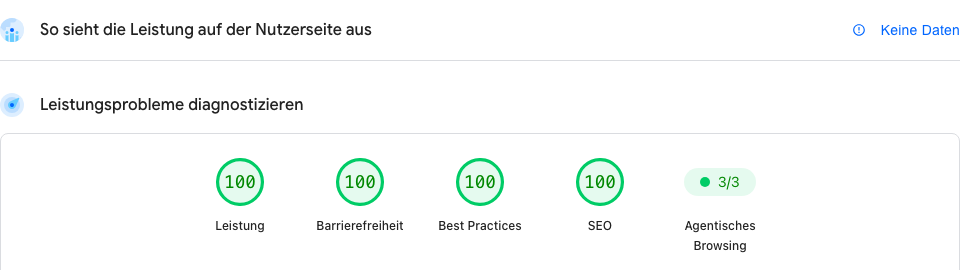
The update-free principle can also be adopted permanently: what is the interim solution today then becomes the actual website. If you would like that for your site, you may write to me, riedel@riedelit.de, subject “Make website update-free”; what I can take on is under A frank word.
4. For agencies and administrators: interim values, restart, patch prompt
This part is for everyone who manages their own server or VPS (Plesk, cPanel, Docker, Ubuntu or Debian). Customers of a hosting package cannot set any of this; they only select the PHP version, as described above.
Mode: Apache with mod_php is hit hardest: there the attack strikes before the website even runs, so even an empty test page is exposed. With PHP-FPM a complete attack has not been demonstrated yet, but the PHP team rates it as possible. With mod_php, php_value lines in .htaccess are part of the attack path; values in .user.ini, .htaccess or via ini_set do not take effect according to the PHP project, only server-side ones (php_admin_value, php.ini, FPM pool).
Interim values until the update (from the official security announcement): session.upload_progress.enabled = 0, post_max_size = 8M (32M if uploads are needed), max_input_nesting_level = 8, expose_php = 0, on PHP 8.5 fatal_error_backtraces = 0, and with PHP-FPM a low pm.max_requests. memory_limit = -1 removes the memory cap and can bring the server down; only with monitoring and only briefly. No memory limits via ulimit (RLIMIT); those trigger exactly the bug. Alternatively block file uploads (multipart) at the web server or allow GET/HEAD only. Web firewalls (including Imunify360 at the host) cover only one of the two attack paths.
After every change and after the update, really restart all PHP processes: an apachectl graceful keeps the old mod_php loaded. Verify the running version afterwards through a page request (phpinfo, delete it afterwards), not on the command line. Still without a fix so far: Plesk for 7.4/8.0/8.1, Alpine-based containers and Remi packages. pfSense: Plus 26.07/26.03.1, CE 2.9.0/2.8.1, command line only; OPNsense 26.7.7 and Business 26.4.2p3.
Note as of the cut-off date, 16 November: Attackers chain PHP2Shell with flaws in the operating system, on firewalls for example with a flaw in the Linux kernel. So update PHP and the system. For the further flaw around upload progress (CVE-2026-115560), the PHP project advises keeping session.upload_progress.enabled = 0 set on the server side until the next regular update is released; it had not been released by the cut-off date.
Patching with AI assistance: if you have no administrator, Claude Code can guide you; the prompt demands a question before each step and nothing without a backup.
You don't need to read the text or fill anything in: copy, paste, send. The helper then asks you step by step.
You are my patient IT helper for my own server. I am not an administrator. My goal: close the PHP security flaw of 21 October 2026 (“PHP2Shell”, CVE-2026-109618 and CVE-2026-109619) on this server. Nothing without a backup.

How we work:
- You ask me only one question at a time and wait for my answer.
- For factual questions you give me numbered answers to choose from, always including “I don't know”. I can answer with the number. For yes/no questions, yes or no is enough.
- If I say “I don't know”, you give me a simple command or click to find out and explain what the answer means.
- No placeholders in square brackets: if you need something, just ask.
- If you are not sure of a menu name or a provider, say so openly and describe what I should look for. Don't make anything up.
- If you look something up yourself (for example on my website), tell me how you recognised it. If you are not sure, say so and keep asking me.
- I never write passwords or keys in the chat.
- You explain every command before I run it and wait for my “yes”. I then send you the output.
- No technical terms without a short explanation in brackets.

What you want to know from me, in this order and one at a time:
1. How I manage the server (command line via SSH, Plesk, cPanel, Docker).
2. Which operating system runs on it (Ubuntu, Debian, other).
3. Which web server (Apache, nginx).
4. Which websites run on it and what they are built with.
5. Whether there is a current backup.

Then you sum up in three lines what you understood and ask whether it is right. After that you guide me step by step (“Step 2 of 7”):
1. Check that I am really logged in to the server and not on my own computer (for example with the command hostname). If not, you help me log in via SSH. Then find out which PHP version runs and how PHP is connected (mod_php or PHP-FPM), and what that means for me.
2. If needed, back up first: files, database, configuration.
3. Update PHP via my system's packages. The target is 8.5.12, 8.4.27, 8.3.36 or 8.2.35, or the patched build (backport) my system offers for its PHP version. With Docker: renew the image.
4. If the package is not available yet: set the interim values from the official PHP security advisory, at least session.upload_progress.enabled = 0 and a small post_max_size, and tell me this only applies until the update.
5. Really restart ALL PHP processes, web server and PHP-FPM. A soft restart (“graceful”) is not enough.
6. Check the running version through a page request (for example a phpinfo page that we delete afterwards), not just on the command line.
7. Look through the logs for traces: piles of error 500, memory-limit messages, unusually large session cookies, PHP processes restarting all the time. You assess soberly what we find.

At the end you remind me to change the passwords and keys the server knows (database, mail, API keys, certificates), in a sensible order. Then you sum up: version before and after, which values are set, what the logs showed, what is still open.

Start now: greet me in one sentence, tell me roughly how long it will take and ask me the first question.
An update-free site is still the safer way.
Template: how to ask your host or agency
Copy, fill in the names, send.
Subject: PHP security flaw of 21 Oct 2026 (PHP2Shell): status of our website
Hello,
on 21 October 2026 two critical PHP vulnerabilities became public (“PHP2Shell”, CVE-2026-109618 and CVE-2026-109619). Please let me know briefly:
1. Which PHP version currently runs for [domain]?
2. Is the patched version (8.5.12 / 8.4.27 / 8.3.36 / 8.2.35) already deployed, or when will it be? Have the 7.4 / 8.0 / 8.1 branches been fixed on your side too, or only 8.2 to 8.5?
3. Which interim measures have you enabled (e.g. session.upload_progress disabled, WAF rules)?
4. Do the logs show any attack attempts against our site?
I would appreciate a reply within one working day. Thank you.
[Name, company, phone]
What the hosts report (last checked 26 Oct, 2:05 pm CET, from their status and help pages)
Green: patch reported. Amber: still running, unclear or no official notice, please check in your customer panel yourself. Everywhere: your own servers (VPS, root, dedicated) are yours to update. Every row re-read at the source on the morning of 24 Oct. Archive: The table shows the status of 26 October; I have not re-checked it since.
| Host | Status |
|---|---|
| Hetzner | Green Patched since 7:50 pm (21 Oct) on all web hosting and managed servers for PHP 7.4 and 8.0 to 8.5, and since 6:32 am (22 Oct) for 5.6 and 7.3 as well. Cloud and dedicated servers: customers patch themselves. |
| netcup | Green Webhosting and managed servers fully patched since 11:45 pm (21 Oct), old versions included; according to a notice at 4:09 am (22 Oct) the Plesk panel (WCP) is reachable again. Root servers and VPS: customers themselves. |
| mittwald | Green Shut down all systems as a precaution at 4:17 pm on 21 Oct; “resolved” since 12:28 am (22 Oct), 7.2 to 8.5 rolled out, only PHP below 5.6 still open. No traces of exploitation. |
| IONOS | Green Completed since 1:03 pm (22 Oct): websites and hosting at IONOS are protected, customers need not do anything. Managed Nextcloud was switched off as a precaution on 21 Oct from 2:26 to 10:55 pm. |
| DomainFactory | Green Completed since 5:07 pm (22 Oct); older PHP versions via backported fixes. VPS customers patch themselves. |
| All-Inkl | Green All PHP versions offered are patched, including old ones. According to All-Inkl, the customer panel, webmail and members area are reachable again; customer websites were not affected by the shutdowns. All-Inkl advises checking your site for unexpected changes. |
| Strato | Green Confirms officially (press release of 22 Oct): the update is installed on all platforms Strato runs, customers need not do anything; VPS and dedicated servers are up to the customer. Had also warned about fake emails referring to the vulnerability. |
| Plesk / cPanel | Green Plesk ships 8.2 to 8.5 and, as backported fixes, 7.4, 8.0 and 8.1; cPanel hosts have all packages from 5.2 to 8.5 via CloudLinux. Since 23 Oct, CloudLinux also ships the packages with the familiar numbers (e.g. 8.4.27), and since 3:10 pm cPanel’s own packages too. Until your host has installed them, a lower number such as “8.4.26” may still show and is patched nonetheless. |
| Host Europe | Green Since 3:30 pm (22 Oct) “all systems successfully patched” (web hosting, cPanel, managed WordPress). Virtual servers: customers themselves. |
| webgo | Green Web hosting, managed virtual servers and dedicated servers fully patched, older PHP versions included; the last ones (managed HDD and SSD virtual servers) since 11:24 pm (22 Oct). Customers need not do anything. |
| Alfahosting | Green All PHP versions patched on all servers: the webX servers since 9:17 am (22 Oct), the hostX servers since about 11 pm (22 Oct), reported on 23 Oct at 12:44 pm. The version number shown sometimes stays the same; customers need not do anything. |
| GoDaddy | Green Since 11:06 pm (22 Oct): web hosting and managed WordPress patched. Own servers and VPS: customers themselves. |
| OVHcloud | Green Web hosting: PHP 7.4 to 8.5 patched on all clusters since the evening of 21 Oct, the older versions 5.3 to 7.3 since 7:07 pm (23 Oct). Since 10:50 am (26 Oct) the maintenance is formally closed too, according to OVHcloud. |
1blu: notice for server customers only (update yourself), no public statement on web hosting. Raidboxes and Hostinger report all offered versions patched.
Background: what happened and how it came about
From here on it is no longer about acting but about understanding: what lies behind the flaw, how it was found, who sounded the alarm and when, how dangerous it is now, and whether the reactions were proportionate. If you only want to know what to do, you will find everything further up.
What happened on 21 October, in plain words?
On 21 October 2026, hospitals, cities and authorities took their websites offline: in the Netherlands, Denmark, Finland and France, federal agencies in Germany, Wikipedia services. Not because they were hacked, but as a precaution; the German hosts are largely back overnight. The reason lies in a component almost every website uses and hardly anyone knows: PHP.
What PHP is, in two sentences: when somebody opens your site, a program on the server assembles it at that very moment, from texts, images, contact form, shop. For roughly seven out of ten websites that program is PHP, the engine behind the site: WordPress, TYPO3, Joomla, Shopware, Nextcloud, the small club site from 2015, all PHP.
On 21 October two severe bugs in this engine became public. Experts call the two bugs together “PHP2Shell” (identifiers CVE-2026-109618 and CVE-2026-109619) and are rated critical at 9.2 out of 10. The picture: somebody can reach through your website's letterbox and press the door opener from inside. No password, no user account, just your site's address. Every PHP version since PHP 5 is affected, the company site with five pages just like the hospital. The PHP project ships ready-made updates for PHP 8.2 to 8.5; for older versions many hosts have built their own fixes, who did is in the host table.
How was the flaw found?
The Californian security firm Calif combed PHP for bugs in OpenAI's “Patch the Planet” programme and reported the flaw to the PHP project on 11 August 2026; the security firm Wiz found the same spot independently. AI was the tool, not the discoverer: a language model helped try out variants; decisions and the patch were made by people. The flaw is old: the faulty code has been in the engine since PHP 5.4 from 2012.
More on the discovery: who reported when, why it took so long, how it became public
On 30 July 2026 OpenAI invited the Californian security firm Calif to “Patch the Planet”, a programme in which researchers deliberately comb widely used software for bugs; Calif chose PHP. A Calif researcher found the first bug in early August and reported it to the PHP project on 11 August; the same day OpenAI independently reported the same root cause, and on 24 August the security firm Wiz did too.
AI was the tool, not the discoverer. Calif describes a language-model companion that helped try out variants, and writes itself that no model finds something like this on its own; what mattered was knowing the history of the target. The PHP Foundation says: the tools helped find and sort, every decision and every patch is made by a person. That three teams found the same spot does show, however, that it had become reachable with today's tools, for attackers too.
The flaw is old. The faulty code has been in the engine since PHP 5.4 from 2012. The class of bug behind it, an abort when the memory limit is exceeded during which PHP does not clean up properly, has been known since 2004; a bug report followed in 2020, and an audit in 2024 found a related problem but considered it not exploitable. The fix required a deep change to the engine, and without proof nobody wanted to touch it.
How it became public. Those involved kept the flaw quiet until the update was ready (the technical term is embargo); the plan was 22 October, 4 pm CEST. On 20 October at around 5 pm the identifiers surfaced in a forum, with a wrong rating and a wrong date; a security firm confirmed they were real. The PHP project brought the pre-announcement forward that evening and the patch forward by a day. At around 10 pm Calif accidentally published a short demonstration video. That raised the pressure but did not cause the leak.
What remains open: who fed the forum post; how an attacker already knew about the flaw on 17 October; whether Calif will ever release its testing tool. Ready-made third-party attack tools are now public as well (what this means); confirmed break-ins have existed since late October, mainly on firewalls (status).
The alert path: who sounded the alarm, and when?
Times in Central European Summer Time from the sources below; where a source gives none, the part of the day is stated.
-
11 August The quiet report
Calif reports the flaw to the PHP project, OpenAI the same day, Wiz on 24 August. PHP schedules disclosure for 22 October, 4 pm.
-
17 October First attempts, before any leak
Amazon sees the first attack attempt against its honeypots. Who it was and where the knowledge came from is open; the White House is briefed the same day.
-
20 October, from 5 pm The leak
The identifiers circulate in a forum; in the evening a security firm confirms they are real. At 9:33 pm the PHP project brings its pre-announcement forward; at around 10 pm the Calif video appears by mistake.
-
21 October, 5:02 am The first shield
Cloudflare switches on protection rules for all customers, nine hours before disclosure, and reports attack traffic in the morning, without numbers; in the press that becomes “already exploited”.
-
21 October, morning The chain of authorities
NCSC-NL, the Dutch cyber agency, takes its own website offline as a precaution at 11:03 am; authorities in the Netherlands, Finland, Denmark, France and Germany's federal IT centre (ITZBund) follow. Germany's BSI warns of the “need for immediate action”, criticality “very high”, without recommending shutdowns in its press release; the UK's NCSC explicitly advises against going offline.
-
21 October, 2:16 to 4:17 pm The hosts decide
One German host first switches off uploads, then at 4:17 pm all systems; another its Nextcloud instances. Others patch in place. Who did what is in the host table.
-
21 October, 4:00 pm The patch
The PHP project releases 8.5.12, 8.4.27, 8.3.36 and 8.2.35; the discoverers publish their reports; Debian and Ubuntu ship packages; the US agency CISA advises taking systems offline that cannot be patched immediately.
-
21 October, 6:51 pm This page goes online
First version with the first 10 minutes, traffic light, guide and template; continued since, the log is at the end of the page.
-
21 October, evening to night The hosts return
7:50 pm Hetzner patched, 11:45 pm netcup, 12:28 am the host that had shut down is back (around eight hours of downtime), 2:07 am cPanel packages for every version. None reports traces of exploitation.
-
22 October, morning Clean-up
The big German hosts are patched, Hetzner also for PHP 5.6 and 7.3. According to heise, many government and university sites were still offline as a precaution. No victim confirmed.
-
22 October, evening Breathing out
All big German hosts report completion, Strato and All-Inkl included; many government, hospital and university sites are back. Germany's BSI stays at orange and refutes reports of bypassable patches.
-
23 October, morning A quiet night
A quiet night: no confirmed victim, no new warning level, no new PHP release. GoDaddy and OVHcloud report their status; at Alfahosting the completion notice for part of the servers is still missing. IONOS and Strato warn about fake emails referring to the vulnerability.
-
24 October Last hosts report completion
The last hosts, among them Alfahosting, webgo and OVHcloud, also report completion for all servers and older PHP versions. The SANS early-warning centre is back to green since 23 October; Germany's BSI stays at orange. The PHP project advises keeping one protective setting until the next regular update; nothing changes for hosting customers. Public attack tools exist, a confirmed victim still does not.
<
How dangerous is the flaw now?
No credentials needed: the attacker only needs your website's address and sends it crafted requests, several thousand until one lands; for a program no obstacle. Once inside, they can do whatever your website is allowed to do (change files, plant a backdoor, copy customer data, send spam) and read passwords and keys from the server's memory. There are attacks, and they succeed where nothing was updated: Amazon saw the first attempt on 17 October against its honeypots; since 26 October the US cyber agency CISA has listed the flaw as actually exploited, and since late October break-ins on firewalls have been documented.
Attack tools are openly online: what this means for you
Since the flaw became known, quite a few projects have appeared on GitHub, the big platform for program code, that claim to attack it. I have looked at the page of one such ready-made attack tool, reading only, downloading nothing. I deliberately give neither its name nor its address nor a link: this page is meant to help you, not attackers.
What I noticed: the tool comes fully packaged, with instructions, a practice setup and a part that tracks down vulnerable servers on its own. At the top it says it is only meant for authorised security testing; that sentence will not stop anyone. Many people have already bookmarked or copied it.
What this means for you: attacking takes less expertise than a few days ago, and the search for unprotected servers runs automatically. Being small does not protect you. At the same time, according to its own description this tool only works under certain conditions: a particular way the server runs PHP and an exactly matching PHP version. In my estimate that affects own servers more than shared hosting. Nobody has independently confirmed that it works reliably, and I am not trying it out; the security firm Sansec considers the circulating attacks ineffective against a normally configured installation. Confirmed break-ins now exist, mainly on firewalls and devices with an open admin interface. For ordinary, updated websites at a host, no break-in had been documented by the cut-off date of 16 November, as far as I have read; that is a non-finding, not proof of an all-clear.
What to do now: nothing new, just do not wait any longer. With a website at a host, check the PHP version in your customer menu once (guide). With your own server, install the update now and really restart PHP (for administrators). Unsure whether someone is already in: how to tell. And if you want to be rid of the question for good, make the website update-free. Experts call such tools an “exploit”.
Confirmed break-ins: yes, mainly on firewalls
Cut-off date 16 November 2026. Since 26 October the US cyber agency CISA has listed the flaw as actually exploited. Documented are break-ins into firewalls whose admin interface was reachable from the internet: at least 25 according to the security firm Dream, confirmed by Palo Alto Networks; a few dozen devices without the update according to Check Point. Nobody gives a total number. For WordPress sites, the security firm Wordfence knew of no takeover through the flaw on 28 October. What this means for you: an updated server is protected; an admin interface on the internet without the vendor's update is demonstrably open to attack. Correction: Until 26 October this box said “Confirmed victims: 0”. From that day on it was out of date, and I corrected it too late.
Why it gets more dangerous after disclosure: with the patch everyone knows where to look; attackers compare the old and the repaired code and build attacks against everyone who has not updated yet. Experts call this an “N-day flaw”: known and fixed, but not yet installed everywhere. Disclosure is still right, because defenders get the patch at the same time. So the dangerous period begins now and hits those who do not install it. I expect a larger wave, as an estimate, from about 28 October, above all on servers running old PHP versions without a fix: the security firm VulnCheck counted over 700,000 externally visible servers on PHP 7.3 or older; that is what is visible from outside, not the number of unpatched ones. On the evening of 22 October, two voices point towards easing: Germany's BSI currently sees no large number of attacks, and the shop-security firm Sansec considers mass exploitation less likely than on release day, because the circulating attacks do not work against a default installation. For servers on old PHP versions without backported fixes, this changes nothing. Up to 24 October there is still no confirmed break-in, and the SANS early-warning centre has lowered its alert level. Note as of 16 November: The expected wave came, but differently than assumed: not at websites with a host, but at firewalls with an open admin interface, whose built-in PHP was often old. The advice stays the same: if you have not updated yet, do it today.
Hence my advice: update now if not done yet, not next week; the deadlines are in the first 10 minutes. Anyone with personal data on the web (practice, law firm, club, shop) does not wait.
Was it right to take so many websites offline?
This is my assessment as a guide, not a verdict, and it may change. For a practice, club or shop at a hosting provider, “take the site offline” was never necessary at any point. What was and is necessary: take a backup, check the PHP version in the customer panel, ask the host. The risk sat with the host, and the large hosts carried it. Going offline was only the emergency brake for sites with customer data where the update was not possible.
Authorities and hosts faced a different situation: many systems at once, a 20-hour head start for the leak, a demonstration video, an attack without login, the patch not before 4 pm, and the breadth of “everything with PHP”. The warning bodies stayed graded: Germany's BSI chose “very high” rather than the top level and named shutdowns only as an option for systems without an immediate update; the UK's NCSC set out an order in which going offline is step four of six. Some hosts patched in place, one stopped all systems for around eight hours and reported every step with a time; several authorities took entire portals offline as a precaution. Whether the large shutdowns were necessary could not yet be judged on 22 October. Since then there have been victims, mainly on firewalls with an open admin interface (see the checkpoints below). Whether taking entire government portals offline across the board was necessary is not settled by that. As far as I have read, it is the first case in which entire portals went offline before a confirmed victim. The headlines (“internet collapse”, “70 percent of the internet”) went further than the texts beneath them, which were mostly correct.
What earlier cases teach, one sentence each:
| Case | Disclosure → first exploitation | Shutdowns? | Lesson |
|---|---|---|---|
| Log4Shell (12/2021) | Scans nine days before disclosure, botnets the same day; trivially easy. | Yes: Canada's tax agency, around 4,000 sites in Québec, Germany's health telematics. | The 2022 US review found exploitation lower than expected; the price was patch fatigue. |
| MOVEit (06/2023) | The data was already gone before the advisory came. | Only that one product offline, not whole web presences. | Necessary: over 2,600 organisations affected; cutting it off was the only remedy. |
| Citrix Bleed (10/2023) | Exploited since August, disclosed in October, surge after the public re-creation. | Isolate individual appliances, no blanket shutdown. | The patch alone was not enough; stolen sessions had to be terminated. |
| regreSSHion (07/2024) | Fix with the disclosure, laborious attack, no confirmed exploitation to this day. | None. | Much noise, no mass attack; that is how PHP2Shell could have ended. Note as of 16 November: that is not how it turned out. |
| Heartbleed (04/2014) | Fix with the disclosure; the next day 900 records stolen at Canada's tax agency. | The tax agency offline for five days, after the theft. | Too late rather than too early; the real lesson was the project's underfunding. |
The pattern, as an assessment: blanket shutdowns have so far only happened where the attack was trivially easy or victims were already known. On 21 October neither applied to PHP2Shell; victims exist now, mainly on firewalls with an open admin interface.
How to measure in 7 to 30 days whether it was overblown:
- The US list of actually exploited flaws (KEV): an entry within 14 days argues for “justified”, none for “overblown”.
- Confirmed takeovers with a number from hosts or warning bodies, above all at those that did not shut down.
- A reliable public attack tool for ordinary 64-bit servers within seven days; only then does the situation tip for shared hosting.
- The return of the government sites: with an incident report or silently; more than 48 hours without a report argues for “overblown”.
- The follow-up reports: numbers, or only “could have”?
What came of it, up to the cut-off date of 16 November: The first checkpoint is met: the entry in the US list came on 26 October, five days after disclosure. By my own yardstick that argues for “justified”, at least for devices with an open admin interface. Numbers come only from vendors, for their own devices, none from hosts. A reliable attack on normally configured websites has not been shown. Whether taking entire government portals offline across the board was necessary is not settled by that.
Three questions I was asked most often on 21 October
Do I really have to take my site offline?
No, not as the first step. The order is: backup, switch the PHP version, click through. Going offline is only the emergency brake if the update is not possible and the site holds customer data, logins or a shop. Even then the web business card is usually better than an empty page; the UK's NCSC advises the same.
If someone is on the web server, can they read my e-mails too?
Not automatically, but by detours. The attacker gets your website's rights, not your mailbox's. Three detours are real: first, if your website sends mail itself (contact form, shop), that mailbox's password sits in the configuration or in memory, and the flaw can leak it. Second, if webmail (such as Roundcube) runs on the same server, because it runs on PHP. Third, if website and mailbox share a password.
So after a break-in: change the passwords the website knows, check forwarding rules and the “Sent” folder, enable two-factor sign-in (a code to your phone). Without a break-in: first the update, then over the next days change the passwords, one after the other; frantically changing everything in one night causes more lock-outs than security.
Is it enough to put WordPress or the shop into maintenance mode?
No. Maintenance mode is a page that PHP displays; PHP keeps processing every request, including the attacker's. Protection only comes without PHP (a copy made of finished pages, without updates), with uploads blocked at the web server, or fully offline.
Where I follow the situation
I read these sources for this page, up to the cut-off date of 16 November 2026. If you read only one: the first.
- PHP project: official security announcement, the source for version numbers, affected setups and all interim settings.
- PHP Foundation: report on the security release, timeline, leak and the role of AI from the project's point of view.
- Calif: the discoverers' write-up, how the flaw was found (technical).
- SANS Internet Storm Center, early-warning centre: back to alert level green since the morning of 23 October, with a look back at the week.
- NCSC-NL: software inventory “php2shell”, list of affected products (Plesk, QNAP, Synology, Shopware …).
- Cloudflare blog, a view of real attack traffic, plus the protection rules.
- Amazon Threat Intelligence (AWS blog), observations from Amazon's honeypots, including the first attack attempt on 17 October.
- Wiz Research, co-discoverers, technical analysis and detection signals.
- CISA alert and the UK NCSC alert, government guidance in English.
- BSI press release (German), the German federal office rates the criticality “very high”; its cyber security warning (PDF, German, version 1.2 of 22 October) is at level 3 / orange.
- Sansec, security firm for online shops, a sober assessment of how likely mass attacks are.
- ENISA: joint statement of the EU bodies (European Commission, ENISA, CERT-EU, Europol) on what organisations should do now.
- BleepingComputer, 26 Oct: first documented successful attacks, on three unpatched decoy servers of a security researcher.
- BleepingComputer, 27 Oct: the US cyber agency CISA lists the flaw as actually exploited.
- SecurityWeek, 30 Oct: break-ins into Palo Alto firewalls, no known takeover of WordPress sites.
- Check Point Research, 12 Nov: the vendor's report on two waves of attacks against its devices (technical).
- GoDaddy status page and OVHcloud status page (web hosting), the two hosts’ own notices.
- dpa report of 22 October (German): the federal digital minister sees no sign of a break-in into federal administration systems; many state websites are back online.
- heise online (English), analysis with quotes from the PHP team.
A frank word: who can help you today
My existing customers will hear from me directly, or can reach me by phone and email. I cannot take on new jobs related to this flaw at the moment; I am a one-person business, and the capacity belongs to the customers I already look after. The one exception: switching a website to update-free, you may write to me about that; I answer in order of arrival and say honestly whether and when I can take it on. For everything else the right contacts are your host (support ticket, status page), your agency or the provider who built the site, and after a break-in involving personal data also your data protection officer. That is not brushing you off, it is the faster way: they know your setup, I do not. This page is my help for everyone else: share it.
Did you land here because of a broken hard drive, a NAS or deleted files? Then you are in the wrong section here: that is what I am there for, every day, under Data Recovery Stuttgart; who I am is under About me. For a break-in on an existing customer's server or NAS the same rule applies as to every drive in my workshop: do not clean up, first the image. The “describe your case” form is meant for storage media, not for websites. Is your computer stuck at a blue key screen? Then read The key question for the days ahead further up.
Frequently asked questions
My computer asks for a BitLocker key at start-up. What should I do?
Do not reset and do not reinstall: according to Microsoft, resetting without the key removes all your files. Photograph the screen with the key ID and look for the key from another device. The screen is a protective feature of Windows and appears when something has changed at start-up, for example after an update.
Where do I find my BitLocker recovery key?
Usually in your own Microsoft account at account.microsoft.com/devices/recoverykey, otherwise on a printout or USB stick from the setup; for devices from an employer or school, the IT department usually has it. Microsoft support cannot retrieve a lost key. If signing in to your Microsoft account is not working right now, try again later and do not reset anything until then.
Is the key prompt connected to the Microsoft 365 outage?
That has not been shown. The key screen appears when Windows notices a change at start-up; in April 2026 Microsoft confirmed this for one of its own updates and fixed it in May 2026. Up to 16 November I found no reports of more such cases in November 2026. The outage can, however, block the way to the key if the sign-in code for the account comes by email and the email is stuck.
What happened in the Microsoft 365 outage of November 2026?
From the evening of 12 November 2026, Microsoft 365 services were disrupted worldwide, above all email (Exchange Online) and scheduling Teams meetings. Microsoft gives the end as 13 November, 5:10 pm German time (CET); by the morning of 14 November, according to Microsoft, the last affected customers were back in service too. Microsoft sees no indication of an attack and names as a first cause a problem with an earlier expansion of its network capacity; a detailed report has been announced.
I am missing an email from the days of the Microsoft outage. What should I do?
If an important email from 12 to 14 November 2026 is missing, ask the sender. If you received an “undeliverable” notice, send your email again. Microsoft had extended the waiting time for delayed emails to 48 hours so that they would not be lost; that is why a lot of mail only arrived late.
Does the Microsoft outage have anything to do with the PHP flaw PHP2Shell?
As far as is known: no. The Microsoft 365 outage of November 2026 and the PHP security flaw of 21 October 2026 are two separate events with separate causes; no connection has been shown. The PHP flaw affects websites and devices with PHP; the Microsoft outage affected Microsoft's own cloud services.
Do I have to change all my passwords now?
Not because of the Microsoft outage, because Microsoft sees no indication of an attack, and changing everything in a hurry is more likely to lock you out. It makes sense to check calmly whether sign-in codes only come by email, and to set up a second way. If an email asks you to confirm your account because of the outage, do not click.
What does digital sovereignty mean for a small business?
Keeping your options open: having a second way for email, sign-in and data when one provider fails. Three checkpoints: Does at least one sign-in code come by a way other than email? Has the backup ever been restored? Can urgent matters be settled by phone? It does not mean running everything yourself. The question behind it: If exactly one part fails, can I still get to my key?
Technical terms for reference
The blue key screen is called “BitLocker recovery” (the drive encryption of Windows). The disrupted Microsoft services are called Exchange Online and Microsoft Teams, together Microsoft 365. The confirmation code at sign-in is called a “second factor”. The PHP flaw is named “PHP2Shell” (CVE-2026-109618 and CVE-2026-109619).
Information, not advice: whatever you change on your computer, website or devices, decide it with the person who knows your setup.
Sources
Microsoft outage and key screen
- zdfheute, 14 November 2026: disruption fixed (German)
- Tagesspiegel (dpa/Reuters), 14 November 2026: cause a network upgrade, no indication of an attack (German)
- CNBC, 12 November 2026, updated 14 November
- azureblog.co.uk: timeline of Microsoft's notices
- Microsoft Support: Find your BitLocker recovery key
- Windows Latest, 14 May 2026: April update triggered the key screen, fixed in May
Chernobyl
- Sebastian Stude: Tschernobyl und die Stasi, bpb Deutschland Archiv, 21 April 2016 (German)
- Astrid Sahm: Dimensionen einer Katastrophe, bpb/APuZ, 2006 (German)
- Harald Müller: Aus Schaden klug?, bpb/APuZ 29/1987 (German)
- Wikipedia: Chernobyl disaster
PHP flaw: see Where I follow the situation.
What becomes of this page
This page was created on 21 October 2026 as help with the PHP flaw. Since 16 November 2026 it has also told the story of the November days with the Microsoft outage, with a focus on keeping a level head. It tells the situation up to the cut-off date of 16 November 2026 and is not continuously updated. The help with the PHP flaw remains complete, in the reference section further up; the old address and the short address riedelit.de/en/php2shell lead here. Should I ever again consider a situation important enough to follow it for my customers, it will get its own dated page; not for every report in the press, but when it hits businesses like the ones I look after.
What has been added since the first version (update log, newest first)
- 16 November 2026: Page retold: the November days with the Microsoft outage, the key screen and why a level head helps most at such a time; the help with the PHP flaw complete in the appendix for website owners below, told up to the cut-off date of 16 November. New address, the old addresses redirect here. Corrected: the box “Confirmed victims: 0” had been out of date since 26 October.
- 2:12 pm (26 Oct): Situation re-read. For the first time it is documented that the attack can succeed in the wild: on three unpatched decoy servers a security researcher had set up as a trap. A real victim is still not confirmed; a reported government case was withdrawn by the security firm. Nothing changes for patched servers. No news from the hosts; OVHcloud’s maintenance is now formally closed. BSI stays at orange, SANS at green, no entry in the US list.
- 11:52 am (24 Oct): Situation and host table re-read: still no confirmed victim. Alfahosting, webgo and OVHcloud now report completion for their last servers and older PHP versions too; at All-Inkl, webmail is back. The SANS early-warning centre is back to green, Germany's BSI stays at orange. The PHP project advises keeping one protective setting until the next regular update; nothing changes for hosting customers.
- 6:06 am (24 Oct): New: attack tools for the flaw are openly online. I looked at one and explain under “How dangerous is the flaw now?” what this means for you; I will not link to any. Also updated: the deadlines in the emergency box, “What remains open” in the background section and the criterion for judging whether the reaction was overblown. The three self-help prompts now ask you step by step, with answers to choose from, instead of gaps to fill in; tested in Gemini and sharpened.
- 12:41 pm (23 Oct): Situation and hosting table updated to the morning of 23 October: no escalation overnight, still no confirmed victim. IONOS, Strato, All-Inkl, DomainFactory and Host Europe report completion, Plesk now also covers 7.4 to 8.1; new in the table: Host Europe, webgo, Alfahosting (no completion notice yet), GoDaddy and OVHcloud. BSI warning at version 1.2. New: note on fake emails; deadlines in the emergency box updated for 23 Oct.
- 5:53 pm (22 Oct): Title and headings in plain language: “Self-help” first, the technical term “PHP2Shell” only for reference.
- 5:47 pm (22 Oct): New page title “Self-Help and a Website Without Updates”. “Static” is now called “update-free”: a website that needs no security updates because it consists of finished pages; plus “Why this matters more and more”. Self-help easier to use: a “Which helper fits?” guide with copy buttons right under the heading, an example of how the conversation with the helper starts, setting up the AI helper as its own section beforehand, shorter headings for the expandable sections.
- 5:20 pm (22 Oct): The vulnerability is now public, so there is a short “Why now?” at the top. Making the site static is now a recommendation for everyone, not just the emergency option; new in self-help: “What does static mean?” with the benefits at a glance.
- 11:38 am (22 Oct): long-term version: help first, background bundled (discovery, alert path, how dangerous, proportionality), situation and host table updated (11:31 am), new share image; deadlines in the first 10 minutes, Amazon's report added to the sources.
- 11:11 am (22 Oct): long-term version: three new sections “How was PHP2Shell found?”, “The alert path” as a timeline and “Was the reaction overblown?” with a comparison to earlier flaws and criteria to measure the coming weeks; section “Why does it get more dangerous after disclosure?” (N-day flaw); box “Confirmed victims: 0”; headings as questions; situation as of 10:09 am; sources extended by the Calif write-up and the PHP Foundation report; explanatory parts tightened.
- 4:52 to 5:20 am (22 Oct): version following the focus “secure first, then clean up”: backup first, admin part collapsed, “Am I affected?” directly after the first 10 minutes, jump bar, situation as of 4:10 am (no confirmed victim, first attempts on 17 Oct), host table overnight, pitfall “old version number despite patch”, section “What becomes of this page”, header simplified.
- 11:00 pm (21 Oct): host table, old PHP versions corrected (fixes for 7.4/8.0/8.1), question added to the template.
- 8:00 pm: assistant prompt with options, solution picture next to self-help, rule “backup first, guidance or own risk”.
- 7:15 to 7:45 pm: self-help as expandable sections: make static, backup, patch for own servers, benefits of a static site, three ways to put the copy live.
- 6:20 to 6:55 pm: first version: first 10 minutes, am I affected, step by step, interim measures, spotting a break-in, template, sources; web business card, three frequent questions, note “information, not advice”.