
External hard drive · 2 TB · FAT32

Benjamin Riedel
You call, I answer.
When the customer brought me his external 2 TB hard drive, his Windows had already stopped recognizing it. The drive held data that had grown over many years and that he urgently needed back. Inside the enclosure (an Intenso Memory Case) sat a Toshiba MQ04ABD200 drive.
What was wrong
The drive had simply aged: classic wear. An elevated shock reading suggested that knocks during operation had accelerated the decline. The FAT32 allocation table in the root directory was destroyed. The drive was unreadable, and the names of the main folders were lost.
- 16,360barely readable sectors
- 4,464read aborts
- 100%read out
My solution, step by step
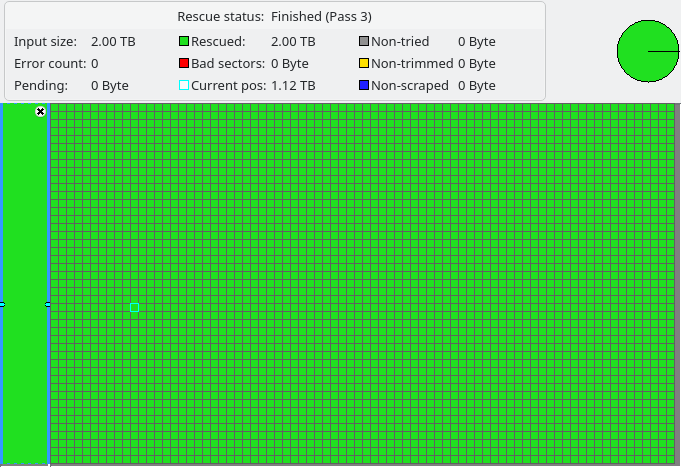
- Sector-by-sector 1:1 clone on specialized hardware. First I created an exact image so that the ailing original is spared. Every further read attempt then happens on the copy only. Despite the barely readable areas I read the drive out 100 percent, as the clone log above shows.
- File system analysis and reconstruction. Using specialized software I rebuilt the destroyed data structure from the raw data.
- Manual assignment. Because the main folders had lost their names, I assigned and verified them by hand, based on a file list from the customer and targeted cross-checks.
- Secure handover. I provided all recovered folders and files on a loan drive.
Result: 100 percent of the data read out and successfully reconstructed. Before signing off, the customer was able to check the file list and inspect samples, either on site through someone he trusts or together with me by phone or video call. That way he knew everything was there before he gave his approval.
Technical details (for the technically minded)
- Medium: external 2 TB hard drive, Toshiba MQ04ABD200 drive, FAT32 file system
- Current pending sectors: 16,360
- Read aborts (device error log): 4,464
- Read-out rate after cloning: 100%
- Tools: hardware imager, UFS Explorer / IntelliRAW
My advice from this case: When a hard drive becomes sluggish or read errors start piling up, that is not a "it will be fine". It is the beginning of wear. So: switch the device off and stop using it. The sooner you call, the better your chances.
Is your hard drive acting up?
Free initial consultation, you reach me directly without a waiting queue.